

table of contents
Looker Studio Pro – Is it Worth it?
After almost two and a half years, an ambiguous start, and a consistent stream of updates, we ask the question: Is it finally time to upgrade to Looker Studio Pro? We’re going to explore some of the key benefits of the enhanced version of Google’s data visualisation platform, and whether it’s worth the asking price!
From Google Data Studio to Looker Studio
Let’s start with very brief history lesson to provide a bit of context for those not familiar. Google Data Studio was first launched in 2026, introducing a powerful and free data visualisation tool into the Google Marketing Platform suite of products. Jump forward to early 2020, and Google acquired Looker, a business intelligence platform similar to Tableau or Power BI, for $2.6 billion. Over the next two and a half years, the two fell in love and a new platform was born…
After a couple of years, in October 2022, Data Studio was rebranded and relaunched as Looker Studio, or “The artist formerly known as Google Data Studio” as we unsuccessfully coined it (that’ll take off any day now). Crucially, the core functionalities of Looker Studio – those that were available in Data Studio before it – remained completely free to use. This was a rebrand rather than a significant evolution of the service, but one notable announcement during the relaunch was the introduction of Looker Studio Pro, a premium subscription model offering advanced features, enhanced capabilities, and new functionalities for a paid fee.
Key Benefits of Upgrading to Looker Studio Pro
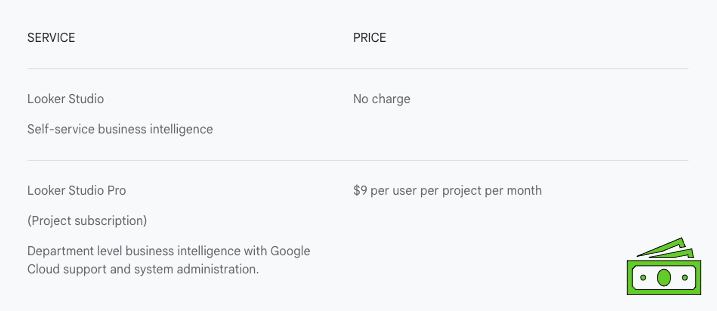
So, the two main questions are: “How much does it cost?” and “What are the benefits?”. While Looker Studio itself remains a free platform, the paid subscription for Looker Studio Pro starts at around $9 per user per month. This will scale with the number of users in your organisation utilising the service, as well the numbers of projects, dashboards, and data sources. If you already have a licence for Looker itself, you may have access to Looker Studio Pro already included so that’s definitely worth checking out.
In terms of what this unlocks, let’s break this down into five key areas.
1. Enhanced Collaboration
- Organisational Ownership
- In the free model, dashboards are assigned to individual users. With Pro, dashboards can instead be assigned to an organisation, ensuring that ownership and permission settings are maintained even if the original creator leaves or team members move to different projects. This simplifies management for large collections of reports and dashboards.
- Advanced Permissions
- Beyond the standard ‘Editor’ and ‘Viewer’ permissions in the free version, Looker Studio Pro introduces ‘Manager’, ‘Content Manager’, and ‘Contributor’ roles, offering finer control over access and editing rights.
- Team Workspaces
- Looker Studio Pro facilitates seamless collaboration through dedicated team workspaces, centralising your reporting efforts. “Happy team, happy reports, happy life” as the saying goes.
2. Advanced Report Delivery
- Multiple Scheduled Deliveries
- While the free version allows one scheduled email delivery per report, Pro enables up to 20 different automated schedules per dashboard. This means you can send different pages of a report to different teams at varying times. This can be achieved on the free version by making multiple versions of the dashboard and creating a different schedule for each one, but if you’re utilising this feature then this could be worth the entry fee alone to save the hassle.
- Enhanced Email Previews
- Previously, scheduled report emails in the free version included a preview of the first few pages of the dashboard. This preview is now exclusive to Looker Studio Pro, with the free version only providing a PDF attachment and a link to the report. This is a notable shift, and raises an eyebrow as to what other features could be locked behind the paywall (or at least, pay-fence) in the future.
- Personalised Reporting Links
- Looker Studio Pro allows you to create customised report links that apply different filters and settings for various teams. This empowers users to interact with the data directly, exploring their own personalised versions of the report without affecting the original. While workarounds exist in the free version (e.g., duplicating dashboards), similar to scheduled deliveries, Looker Studio Pro streamlines this process significantly.
3. Dedicated Mobile Application
- Mobile App
- Looker Studio Pro offers access to a dedicated mobile application as part of the broader Looker app. This provides a more dynamic and mobile-friendly view of your dashboards on the go, automatically adjusting widgets to fit various screen sizes. While the free version has implemented some dynamic viewing features (shout out to responsive layout), the dedicated app offers a more refined mobile experience.
4. Cloud Customer Care
- Technical Support
- Arguably one of the best reasons to upgrade is access to Cloud Customer Care. This provides dedicated technical support for Looker Studio Pro, offering assistance with dashboard queries and troubleshooting any issues you encounter – a crucial benefit not available in the free version.
5. Gemini AI Integration
- AI-Powered Report Building
- Gemini can assist with creating reporting plans, suggesting visualisation ideas, and even helping with calculated fields, custom functions, and data blending using natural language prompts. This can be a game-changer for those tackling more advanced Looker Studio features.
- Automated Presentation Creation
- With a single click, you can generate a Google Slides presentation directly from a Looker Studio report, providing an excellent starting point for sharing your insights.
- Intelligent Assistance
- While it’s important to always verify Gemini’s output (especially for complex functions), it serves as a powerful assistant, accelerating your report building process and even helping you learn more about Looker Studio’s capabilities.

Currently, Gemini integration with Looker Studio is free for a limited time, but Google has indicated it will become exclusive to Looker Studio Pro. Even without the built-in integration, you can still leverage Gemini or other AI tools like ChatGPT to ask Looker Studio-related questions and get advice for your dashboards.

Let’s Recap: Is Looker Studio Pro right for you?
Looker Studio Pro, starting at around $9 per month, offers a subscription service that scales with your organisational needs. The primary benefits cater to medium to large-scale organisations, and focus on improving collaboration, content ownership, and the overall management of their reporting systems. Ultimately, just as the free version does, Looker Studio Pro empowers you to spend less time on report creation and more time on data analysis, identifying trends, and making data-driven decisions. But even less time.
You can try Looker Studio Pro at no additional cost for 30 days, giving you a firsthand look at its features and benefits – so it’s absolutely worth checking out and seeing how much mileage you’re likely to get from the service.
Prefer to watch the video? Watch on YouTube
For early access to our videos, you can register for the GlowMetrics’ Resource Hub, and it’s completely free!
If you’ve enjoyed this overview and want more Looker Studio content, check out our guides on Page and Section Management and Sharing Reports and Dashboards, on the GlowMetrics blog. Please feel free to ask a question or leave a comment below, or contact us at contact@glowmetrics.com.
You can also follow us on @GlowMetrics or subscribe to our newsletter for more tips and news within the world of Digital Analytics and Marketing.
References
- About Looker Studio Pro: https://support.google.com/looker-studio/answer/13715508
- Team Workspaces: https://cloud.google.com/looker/docs/studio/about-team-workspaces
- Calculated Fields: https://support.google.com/looker-studio/answer/6299685
- Schedule Automatic Report Delivery: https://cloud.google.com/looker/docs/studio/schedule-automatic-report-delivery
- Looker Studio Mobile App: https://cloud.google.com/looker/docs/studio/how-to-use-the-looker-studio-mobile-app
- Cloud Customer Care: https://cloud.google.com/support/docs
- Looker Studio Release Notes: https://cloud.google.com/looker-studio/docs/release-notes